
Yes, junk removal companies can take old electronics for recycling when they accept the devices and have an appropriate recycling destination. Pickup alone does not prove that your electronics will be recycled, and data destruction is a separate service to confirm. Before booking, identify every device, ask where it will go, and get the agreed handling instructions in writing.
TL;DR
- Can junk removal companies recycle electronics? Yes, but confirm device acceptance and the recycling destination before booking.
- Expelled connects property cleanout customers with independent providers; confirm electronics handling directly with the provider.
- Back up and erase personal data before handing over computers, phones, or other storage devices.
- Keep damaged batteries and broken screens separate from ordinary cleanout items and disclose their condition.
Can junk removal companies recycle old electronics?
A junk removal company can arrange electronics recycling, but accepting an item and recycling it are different commitments. Your booking should identify both the devices being collected and the handling you expect after pickup.
For an office move, build the electronics list alongside your broader commercial junk removal for office relocations plan. That keeps computers and storage devices from disappearing into a general furniture removal request.
Use this sequence before authorizing collection:
- List the devices. Record the item type, quantity, condition, and location within the property.
- Confirm acceptance. Ask about each category, including televisions, monitors, printers, computers, and loose batteries.
- Confirm the destination. Ask which recycler or receiving facility will handle the electronics.
- Resolve data handling. Decide whether you will erase storage devices or arrange documented destruction separately.
- Record the agreement. Save the accepted item list, handling instructions, and any promised documentation.
A general promise to dispose of items responsibly does not answer these questions. Request details before anything leaves the property.
Why this matters
An electronics cleanout has two separate outcomes: clearing the property and deciding what happens to the equipment. A successful pickup addresses the first; it does not establish the second.
Your 2026 cleanout instructions should distinguish reuse, recycling, and disposal rather than treating them as interchangeable. A working laptop intended for reuse needs different preparation from a broken monitor intended for material recovery.
The same distinction matters for ownership. If devices belong to a tenant, employer, estate, or client, confirm your authority to release them before scheduling removal. Do not treat equipment left in a room as automatically cleared for disposal.
Which electronics removal route fits your job?
Choose the route based on your load, transport needs, and documentation requirements. No single route fits every household or business cleanout.
| Route | Best for | Main advantage | Limitation to resolve | |---|---|---|---| | Junk removal provider with a confirmed electronics route | Mixed property cleanouts that include electronics | Coordinates collection with other accepted cleanout items | Recycling destination and data services require separate confirmation | | Dedicated electronics recycler | Electronics-focused loads or documented equipment retirement | Lets you discuss device handling directly with the receiving operation | Confirm collection arrangements, accepted devices, and documentation | | Municipal or manufacturer collection program | Eligible household devices you can deliver | Provides a defined collection route when your items meet its rules | Check current eligibility, drop-off requirements, and item restrictions |
Choose a junk removal provider for collection convenience, not as a substitute for verifying recycling. For business equipment, choose the route that meets your organization's disposal and information-security requirements.
When comparing routes in 2026, check current instructions rather than relying on an old event notice or a previous pickup. Acceptance rules apply to the particular program and device, not to electronics as one broad category.
Computers, phones, and tablets: protect the data first
Computers, phones, and tablets can hold personal files, saved credentials, messages, and account information. Recycling the hardware does not itself establish that those records have been removed.
Best for routine household devices: back up what you need, sign out of accounts, and follow the manufacturer's current reset or erasure instructions. Deleting visible files alone is not a reliable substitute for preparing the device for transfer.
If a device no longer starts, do not assume its storage is empty. Ask an appropriate technician or data-destruction provider how to handle it without exposing the information you need to protect.
For business devices, follow your organization's approved process. Keep equipment awaiting data clearance apart from items already authorized for collection, and do not release it merely because the hauling appointment has arrived.
Televisions and monitors: identify the screen type
A television or monitor needs a more specific description than miscellaneous electronics. Tell the provider whether it is a flat-panel display or an older tube-style unit, and disclose cracked glass or other damage.
Best for bulky screens: use a collection route that explicitly accepts the screen type and can handle the property's access conditions. Confirm whether the item must be disconnected and removed from a wall mount before collection.
Do not break a screen apart to make it easier to transport. Keep people away from broken glass, describe the damage, and request handling instructions before moving it.
A provider's acceptance of computers does not establish acceptance of every television or monitor. Get an answer for the actual items on your list.
Printers, accessories, and batteries: separate the exceptions
Printers, cables, keyboards, and other accessories need their own entries in the inventory. Tell the receiving provider whether printers contain ink or toner cartridges, and ask whether those components follow a separate collection route.
Best for loose accessories: group similar accepted items so the provider can see what the job includes. Do not hide loose batteries inside a box of cables or assume every small item belongs in the same recycling stream.
Lithium-ion batteries require particular care because damage can create a fire hazard. Do not puncture, crush, or put them in ordinary household recycling; follow the receiving program's handling instructions.
Disclose swollen, leaking, hot, or visibly damaged batteries before arranging transport. If an item is smoking or presents an immediate danger, move away and contact emergency services rather than treating it as a routine pickup.
Why electronics acceptance varies
The answer depends on the specific load and receiving route, not simply whether a company advertises junk removal. These factors belong in your initial request:
- Device type: a computer, tube-style television, printer, and loose battery need separate acceptance checks.
- Condition: intact equipment and broken equipment can require different handling.
- Data requirements: ordinary collection does not establish secure erasure or destruction.
- Receiving facility: the provider needs a destination that accepts the listed items.
- Local rules: check the current requirements that apply where the property and receiving program are located.
- Property access: stairs, loading restrictions, and mounted equipment affect the collection plan.
For a 2026 booking, ask the provider to confirm these details against your current inventory. A previous job at the same property is not confirmation for a different load.
How do I prepare electronics for a property cleanout?
Prepare the electronics as a distinct part of the job, even when the provider is also collecting furniture or other accepted items. Separation makes your instructions easier to follow and exposes unresolved questions before loading starts.
Inventory
Create 2 lists: items approved to leave and items that must stay. Record quantities and device types, and add identifying details where you need to track individual business assets.
Take at least 3 photos: an overall view of the electronics, a closer view of unusual or damaged items, and a view of the access route. These are suggested documentation steps, not a substitute for the provider's own assessment.
Data clearance
Finish backups and the agreed data-handling process before placing devices in the approved collection group. Keep equipment with unresolved ownership or data questions in a separate area.
For business equipment, record who authorized release. Match any asset register to the devices actually handed over rather than relying only on a photograph of the room.
Pickup access
Describe stairs, elevators, loading areas, and any building access requirements. Tell the provider about wall-mounted screens, connected equipment, and anything that requires disconnection or dismantling.
Do not promise that someone else will prepare the equipment unless that responsibility has been assigned. Confirm who handles each task before the collection appointment.
Handoff record
At collection, compare the load with the approved inventory. Resolve additions or exclusions before they are loaded, and keep any receipt or transfer record the provider agreed to supply.
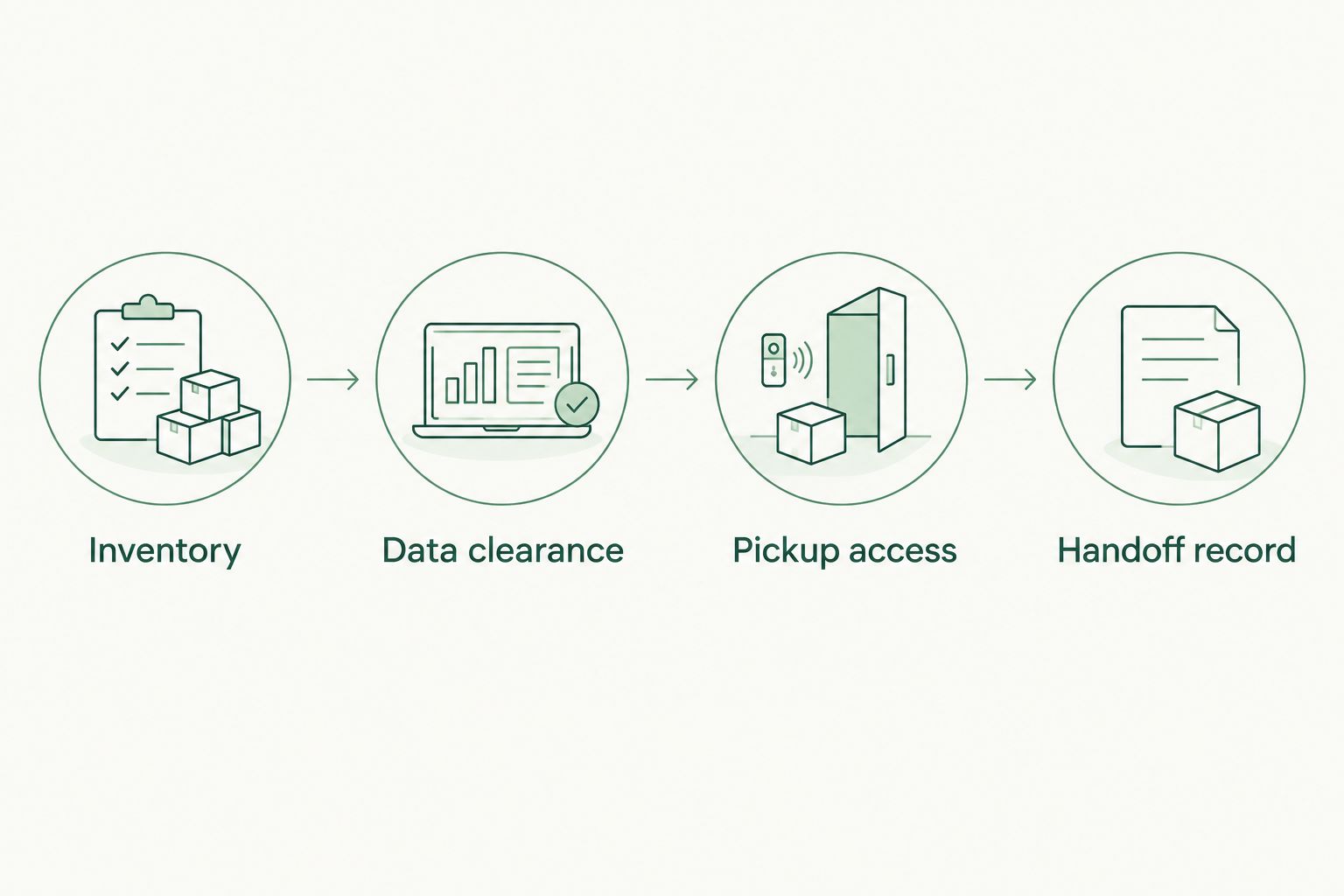
*Resolve ownership and data handling before electronics enter the collection load.*
What should I ask before choosing a provider?
Send the same inventory to each provider so you compare the same job. A useful request includes the device list, condition notes, photos, access details, and your required outcome.
Ask these questions directly:
- Do you accept every device on this list?
- Where will the electronics go after collection?
- Are reuse and recycling handled differently?
- What happens to items the receiving facility rejects?
- Is data destruction included, excluded, or handled by another provider?
- What collection, recycling, or destruction records can you supply?
Keep the written answers with your 2026 cleanout records. Do not interpret a pickup receipt as a recycling certificate or a data-destruction record. Each document needs to describe the service it actually confirms.
Expelled is suited to homeowners, property professionals, and businesses seeking connections with independent property cleanout and junk removal providers. The marketplace helps you find and connect with providers; it does not perform the cleanout itself.
Expelled's marketplace role does not establish a particular provider's electronics acceptance, recycling destination, or data-destruction service. Confirm those details directly with the independent provider before agreeing to the job.
Can I include electronics in a whole-property cleanout?
Yes, include electronics when the provider confirms acceptance for the specific devices. Keep them as a separate line in the job description rather than folding them into a general description of household contents.
For a mixed cleanout, assign each group a clear outcome: retain, reuse, recycle, or another accepted disposal route. Tell the provider which decisions are already approved and which still require authorization.
A cleared room is not proof that every item followed the intended route. Compare the final collection record with the inventory and request any agreed documentation from the appropriate service provider.
Do I need proof that my electronics were recycled?
Request documentation when you need to demonstrate where equipment went, especially for business assets or a managed property. Agree on the document and its issuer before pickup rather than assuming it will be available afterward.
A transfer record shows a handoff; a recycling record should identify the recycling activity it covers. Data-destruction documentation addresses a different requirement and should identify the devices or storage media within its scope.
For your 2026 records, keep these documents with the device inventory and written instructions. Ask your organization's responsible person which records are required before choosing a provider.
FAQ
Can junk removal companies recycle electronics during a house cleanout?
Yes, when the provider accepts the listed electronics and confirms a recycling route. Keep electronics separate in the inventory and ask where they will go after collection.
Will a junk removal company erase my computer before recycling it?
Do not assume computer erasure is included in junk removal. Complete your own approved data preparation or arrange a separate, documented data-destruction service before releasing the device.
Can I put an old television with the rest of my junk?
Keep an old television separately identified until the provider confirms acceptance. Describe its screen type, condition, mounting, and location so the provider can assess the actual job.
Can a recycler take a laptop with a swollen battery?
A laptop with a swollen battery requires specific acceptance and handling instructions. Disclose the condition before transport, do not puncture or crush the battery, and do not place it in ordinary household recycling.
Is a pickup receipt proof that my electronics were recycled?
A pickup receipt alone does not prove that electronics were recycled. Ask what documentation identifies the receiving operation and recycling activity, and confirm its scope before collection.
Can businesses use junk removal for old office computers?
Businesses can use a provider that accepts the equipment and meets their approved handling requirements. Resolve ownership, data clearance, asset tracking, and documentation before releasing computers.
Does Expelled recycle electronics itself?
Expelled is a marketplace that connects customers with independent property cleanout, junk removal, and hauling providers. Confirm electronics acceptance, recycling arrangements, and data services directly with the independent provider.
One last thing
A printer can belong on your data checklist, not just your equipment list. Some printers and multifunction devices store job information or contain internal storage. Check the model's documentation and your organization's requirements before releasing it.
The practical rule is simple: clear the data, confirm the destination, then authorize collection. Reversing that order leaves you trying to resolve questions after the equipment is gone.