
Instead of manually re-explaining an estimate to every hauler, use a Xactimate debris removal workflow that turns the estimate into a written job scope, an authorized provider handoff, and a documented closeout. This 2026 guide covers that document-based process without assuming a software integration or treating an estimate as permission to begin work.
TL;DR
- Keep the Xactimate debris removal workflow separate from work authorization: an estimate describes work, not permission to proceed.
- Expelled connects property professionals with independent providers; confirm debris removal scope and responsibilities directly with the provider.
- Match material descriptions and measurement units before comparing hauling proposals.
- Close the job with completion photos, provider documentation, and a record of approved scope changes.
Why this matters
A debris removal estimate and a field instruction serve different purposes. The estimate describes anticipated work; the field instruction tells an independent provider what to remove, what to leave, how to access the property, and who can approve changes.
Expelled is best for property professionals seeking connections with independent cleanout and hauling providers. You can use Expelled to connect with independent providers, then confirm the job requirements directly. The marketplace does not perform the cleanout itself, and finding a provider does not establish approval of an insurance estimate.
For a 2026 restoration file, keep these decisions separate: what the estimate describes, what the responsible party authorizes, and what the provider agrees to perform. That separation gives you a clear basis for checking completion instead of relying on a verbal description of the job.
Before you start
- Gather the working materials. Have authorized access to the Xactimate estimate, the relevant property photos, and a place to maintain a shared job record. You also need a contact who can explain the site conditions.
- Identify decision-makers. Record who controls property access, who can authorize removal, who can approve scope changes, and who will review completion. Confirm any applicable claim-documentation requirements with the party requesting them.
- Resolve the measurement gotcha. Do not treat an estimate quantity as a provider's loading instruction. Confirm whether each quantity describes material before removal, loose debris, container capacity, or another basis; keep different units separate until their relationship is established.
This is a manual handoff guide, not a software connection tutorial. The bold labels below are suggested fields for your job record, not Xactimate interface controls.
Estimate-to-scope record
Translate the estimate into a field-ready description
- Identify the working version. Record the estimate reference and revision date under Estimate reference. Add the property identifier and the person responsible for the handoff. Use a clear label such as *2026 debris removal scope — approved revision* only after the responsible party approves that scope.
- Extract the removal work. Under Materials to remove, describe the debris covered by the proposed handoff. Separate hauling from demolition, disconnection, sorting, or other work unless those activities are expressly included. An instruction to remove debris should not silently become permission to dismantle part of a property.
- Preserve quantities and units. Copy the relevant quantity and unit into Estimate quantity, then add Field description alongside it. If the quantity needs interpretation, ask the estimator rather than converting it from appearance alone. Keep assumptions visible.
- Define exclusions. Complete Materials to retain and Excluded work. Identify personal belongings, fixtures, documents, or areas that must remain untouched. Describe uncertain materials as requiring review, not as ordinary mixed debris.
- Attach supporting views. Organize photos into 3 photo groups: removal areas, access routes, and items to retain. This is a suggested filing structure, not a minimum evidence requirement imposed by Xactimate or an insurer.
Expected result: A person who did not prepare the estimate can identify the removal area, the materials involved, the measurement basis, and the limits of the assignment.
Do not solve uncertainty by adding a broad instruction such as *clear everything*. Replace it with a boundary the provider can follow: the named room, the marked pile, or the specifically identified materials. Record unresolved questions before requesting a commitment to the work.
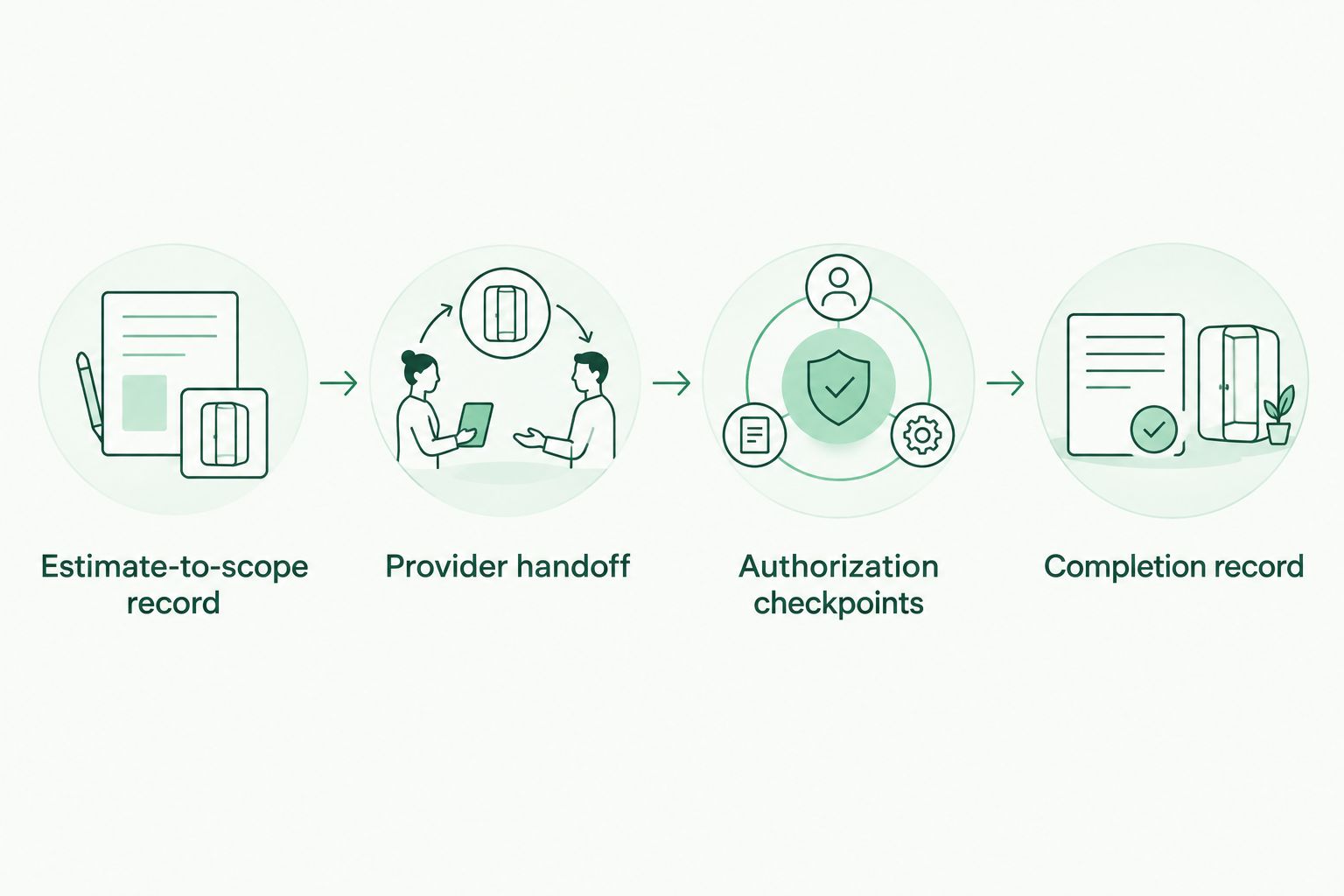
*Authorize a defined scope before work, then compare completion against that same scope.*
Provider handoff
Send the same scope to each independent provider
- Prepare a shareable packet. Include the field-ready description, relevant photos, access instructions, and a contact for questions. Share the information necessary to describe the work rather than automatically distributing the entire claim file.
- Explain access conditions. Complete Access route with stairs, loading location, restricted areas, and any building rules you have confirmed. Explain who arranges entry. Do not assume that a provider's proposal includes every access or handling condition visible only to someone on site.
- Request a written scope response. Ask the independent provider to confirm included materials, excluded materials, handling responsibilities, and any questions requiring a site review. Ask who supplies any proposed containers or equipment and who is responsible for the resulting removal activities.
- Check suitability for the actual debris. Ask whether the provider accepts the identified materials and can meet applicable site requirements. Confirm requested insurance or licensing documentation directly; a marketplace connection is not a substitute for reviewing the documents relevant to your job.
- Compare like with like. Put provider responses beside the same scope record. Resolve differences in material acceptance, access assumptions, cleanup responsibilities, and documentation before choosing a provider.
Expected result: Each provider response refers to the same assignment, and you can identify exclusions without reconstructing separate conversations.
Expelled supports the connection with independent providers; you still need direct confirmation of scope, suitability, and scheduling. That boundary is useful: it makes the provider's actual agreement, rather than the marketplace listing, the working reference for the job.
For restoration-specific selection questions, use the guide to junk removal companies for insurance restoration contractors alongside your scope review.
Authorization checkpoints
Establish permission and control changes
- Name the approving party. Complete Work authorization with the person or organization authorized to commission the removal. Do not infer authority from possession of the estimate, attendance at a site visit, or involvement in a claim.
- Separate work permission from claim decisions. Record any required claim review independently from the property owner's or authorized representative's instruction to proceed. Confirm documentation requirements with the relevant parties; provider acceptance does not establish coverage or reimbursement.
- Set the change rule. Under Change approval, state whom the provider must contact when the actual materials, access conditions, or requested work differ from the agreed scope. Tell the provider which affected work must pause until that question is resolved.
- Create explicit checkpoints. Use 2 approval checkpoints in your process: before the original work begins and before changed work proceeds. These are recommended controls, not a statement of insurer requirements.
- Confirm the handoff. Ask the selected provider to acknowledge the scope version, exclusions, access arrangements, and change contact. Retain that acknowledgment with the authorization record.
Expected result: The provider knows what has been authorized and who can resolve a mismatch without relying on an informal instruction from someone else at the property.
In your 2026 job register, keep approval status distinct from scheduling status. A proposed visit is not written authorization, and an authorized scope does not establish that a particular provider has accepted the assignment.
Completion record
Reconcile the finished work with the authorized scope
- Check the agreed removal areas. Compare the finished condition with the field-ready description and its exclusions. Confirm that retained items remain in place and that any agreed cleanup tasks are addressed.
- Collect matching views. Request completion photos that correspond to the original removal areas. Include the agreed access route or staging area when its condition forms part of the job scope. Matching viewpoints make the record easier to compare.
- Gather applicable provider records. Collect the provider's invoice and any disposal, load, or other documentation agreed for the job. Ask for clarification when a document uses a different material description or measurement basis from the authorized scope.
- Reconcile changes explicitly. Attach approvals for work added, removed, or revised. Record unresolved differences as unresolved; do not mark the file complete simply because a vehicle has left the property.
- Close the record. Maintain 1 scope record that points to the final authorized version, completion evidence, and outstanding issues. Preserve superseded versions separately so the history remains understandable.
Expected result: Another person can trace the assignment from estimate reference to authorization, provider agreement, completed work, and supporting documents.
For a 2026 closeout, use the authorized scope as the comparison point. An invoice describes the provider's billing, while completion photos describe visible conditions; neither replaces the other or automatically establishes that every requirement was met.
When the Xactimate estimate is revised
Use a change handoff whenever a revised estimate affects the provider's assignment. Do not send a replacement document without explaining what changed.
| Handoff option | Best for | Advantage | Limitation | |---|---|---|---| | Initial scope handoff | A removal assignment awaiting authorization | Establishes the original materials, boundaries, and responsibilities | Does not account for later discoveries | | Revised scope handoff | An assignment with changed materials, quantities, or access | Identifies the difference from the previously agreed work | Requires renewed confirmation of affected work |
- Compare the revised estimate with the scope already shared.
- Write a short Change summary covering added work, removed work, and unchanged boundaries.
- Ask the provider whether the revision changes the agreed assignment or requires further review.
- Obtain the relevant authorization before the changed work proceeds.
- Attach the change summary and acknowledgment to the existing job record.
Keep the original scope and the revision distinguishable. A replacement attachment without a change summary leaves the provider to determine whether the new document changes the field instructions.
Troubleshooting
The provider's quantity differs from the estimate
Check the measurement basis before treating the difference as an error. Ask what each quantity measures and retain both descriptions until the estimator and provider clarify the relationship. Do not use an unsupported conversion to force agreement.
The provider finds materials outside the agreed scope
Keep the affected materials outside the authorized removal until the responsible party resolves the scope question. Request photos and a written description, then follow the change-approval process. Refer material-identification or handling questions to an appropriately qualified party.
The property contact asks for extra removal
Verify that the contact has authority to approve the additional assignment. Document the requested change and obtain the required agreement rather than treating presence at the property as authorization.
Completion photos do not show the whole assignment
Compare the images with the original removal areas and identify the missing views. Request additional documentation where it can still be obtained, and record any verification gap rather than describing an unseen area as complete.
The invoice describes different work
Ask the provider to explain the difference against the authorized scope and approved changes. Keep a clear distinction between a wording correction, an agreed change, and work whose authorization remains unresolved.
Customize your workflow
Build a reusable handoff template with the same scope, access, authorization, and completion fields. Keep the template short enough to use on every assignment, but require an answer for exclusions and the change contact. Blank fields hide decisions that still need to be made.
For a 2026 portfolio, assign a file owner to each property and use consistent revision labels across the estimate, provider correspondence, and completion record. Expand the template for building access rules or tenant coordination only when those requirements apply to the job.
When you use Expelled for property cleanouts, carry the same written scope into the provider conversation. The connection starts the discussion; the direct agreement defines the assignment.
Connect with independent providers
Use your written debris removal scope to discuss materials, access, exclusions, and documentation.
[Explore Expelled](https://expelled.online/)
FAQ
What is a Xactimate debris removal workflow?
A Xactimate debris removal workflow connects an estimate to a defined removal scope, work authorization, provider handoff, and completion record. Keep each decision documented rather than treating the estimate alone as a field instruction.
Does this workflow require a Xactimate integration?
No, this workflow uses a document-based handoff. It does not depend on a direct connection between Xactimate and a provider marketplace.
Can I send a Xactimate estimate directly to a hauling provider?
Share the relevant estimate information only when you are authorized to do so, and include a clear field scope. The provider also needs material descriptions, access conditions, exclusions, and an authorized change contact.
Does an approved estimate authorize debris removal?
Do not treat estimate approval alone as permission to begin removal. Confirm work authorization with the party entitled to commission the job and keep any claim-review requirements separate.
How do I compare providers when their quantities differ?
Compare the measurement basis before comparing the quantities. Establish whether each figure describes installed material, loose debris, container capacity, or another measure, and resolve differences with the estimator and provider.
Does Expelled perform debris removal?
No, Expelled connects homeowners, property professionals, and businesses with independent providers offering property cleanouts, junk removal, and hauling. Confirm the assignment and its requirements directly with the selected provider.
What documents should I keep after debris removal?
Keep the authorized scope, approved changes, provider agreement, completion photos, invoice, and any other records required for the assignment. Confirm claim-specific documentation requirements with the relevant requesting party.
One last thing
Write the keep-list before the remove-list is finalized. A clear record of what must remain gives the provider a usable boundary, especially when retained belongings and debris occupy the same area. Include that boundary in both the original handoff and every revision.