
Instead of manually rewriting each asset request for a hauling provider, use a RES.NET foreclosure cleanout workflow that turns the request into a controlled job brief, written authorization, and completion evidence. The process below is a documented handoff—not instructions for a native connection between RES.NET and a cleanout marketplace.
TL;DR
- Use a RES.NET foreclosure cleanout job brief to separate requested work, authorized work, and completion evidence.
- Expelled connects property professionals with independent providers; it does not perform foreclosure cleanouts.
- Confirm removal authority and property access before releasing a cleanout assignment.
- Treat changed asset requests as scope revisions, not automatic permission to remove more items.
Why this matters
An asset request and a provider assignment serve different purposes. The request records what the asset team needs; the assignment must explain exactly what the provider can remove, where the provider can enter, and what evidence must come back.
Expelled is best for property professionals seeking a marketplace connection to independent property cleanout providers. You can use Expelled to connect with independent providers, while keeping asset instructions, authorization, and acceptance decisions under your own control.
For your 2026 workflow, make the handoff repeatable rather than relying on a phone conversation. A provider should not have to interpret an asset manager's shorthand or decide whether belongings are authorized for disposal.
The practical goal is traceability: anyone reviewing the file should be able to match the original request to the approved scope and the evidence returned.
Before you start
- Access and authority: Have authorized access to the relevant RES.NET asset information, a designated person who can approve work, and documented permission for property entry and removal. A foreclosure label alone is not a disposal instruction.
- Job materials: Gather the property identifier, relevant request text, current photos, access restrictions, retained-item instructions, and the required completion evidence. Share access credentials only through your organization's approved method.
- The easily missed issue: Separate a request for an estimate from permission to begin removal. If possession, occupancy, or ownership of belongings is unresolved, route the question to the responsible asset representative or counsel before assigning removal.
Choose a place for the job brief that your team already controls. The field names below are suggested headings for that brief, not RES.NET interface labels; follow the actual controls and permissions in your account when accessing or updating records.
Asset request and job brief
Build the source record
- Identify the asset. Copy the property identifier and address into your job brief. Check both against the source request before sharing anything with a provider; a correct address with the wrong asset identifier still creates a filing problem.
- Preserve the request. Record the request wording, requester, date, and relevant attachments. Keep the source wording separate from your interpretation so a later reviewer can distinguish instructions from assumptions.
- Assign ownership. Name the person responsible for resolving questions, approving changes, and accepting completion. Identify a backup contact if your internal process requires one.
Expected result: Your brief points to a specific asset, a specific request, and a responsible decision-maker. A provider inquiry should not force your team to reconstruct the assignment from separate messages.
Define what removal includes
- Describe the work by area. Use plain locations such as kitchen, upstairs bedroom, garage, and rear yard. Distinguish loose contents from attached fixtures, and identify areas that are outside the assignment.
- Mark retained items and exclusions. List anything that must stay, anything awaiting a decision, and any materials requiring separate handling. Do not turn an uncertain item into an instruction to discard it.
- Document access and evidence. Describe authorized entry arrangements, stairs, parking restrictions, locked areas, and the photos or documents required for review. Keep sensitive access details out of broadly shared photo folders.
Expected result: A provider can explain the proposed work back to you without guessing what “clean out property” means. Resolve differences before requesting authorization.
Use a reusable brief
Copy these headings into your working document. Complete each field or mark it as unresolved; do not leave a blank that another person might treat as permission.
| Brief field | What to record | Why it matters | |---|---|---| | Asset reference | Identifier, address, request date | Keeps the assignment attached to the correct property | | Requested outcome | Areas and contents requiring attention | Defines the job without relying on shorthand | | Removal authority | Approver and written instruction | Separates discussion from permission to proceed | | Retained items | Items and areas that must remain untouched | Sets boundaries for the provider | | Access conditions | Entry permission and physical restrictions | Supports a realistic provider assessment | | Completion evidence | Required views, documents, and reviewer | Defines what must return with the assignment | | Revision record | Date, change, and approval | Makes scope changes visible |
For a 2026 brief, use an actual calendar date in the revision record rather than a label such as “latest.” Keep the previous version so the original instructions remain readable.
Provider assessment and authorization
Request comparable responses
- Send the same scope. Give each provider the same approved information, photos, exclusions, and evidence requirements. Redact information that is unnecessary for evaluating the assignment.
- Ask for written boundaries. Request a description of included work, excluded materials, access assumptions, proposed disposal handling, and the circumstances that require a revised scope. Ask whether an on-site assessment is needed.
- Verify the match. Confirm that the provider can address the specific assignment and supply the documentation your organization requires. Request applicable insurance or licensing information and evaluate it against the job's requirements.
Expected result: Provider responses address the same job. Differences should be visible as scope or handling differences, not buried in unrelated messages.
Expelled connects users with independent providers; the independent provider's proposed scope still needs your review. Do not treat a marketplace connection as asset approval, proof of provider qualifications, or permission to enter the property.
Use the foreclosure cleanout provider guide for additional provider-comparison considerations. Keep your asset-specific requirements in the brief rather than expecting a general guide to define the assignment.
Release only the approved assignment
- Resolve exclusions. Ask the responsible representative to decide unclear items before work begins. If an item remains unresolved, expressly exclude it from removal.
- Record authorization. Preserve written approval for the defined scope and identify who issued it. State that work outside that scope requires a separate decision.
- Confirm the handoff. Ask the provider to acknowledge the assignment, access instructions, retained items, and completion requirements. Record any remaining questions before coordinating entry.
Expected result: The provider has a bounded assignment, and the asset file contains the instruction authorizing that assignment. Neither side needs to infer permission from an estimate request.
Use 2 authorization checkpoints: before initial removal and before any expanded scope. This is a recommended control for your workflow, not a statement about a RES.NET platform requirement.
Completion evidence and record reconciliation
Define evidence before work starts
- Create a photo plan. For each affected area, request 4 photo views: a before overview, a before detail, an after overview, and an after detail. Add other views when the assignment requires them; these are planning instructions, not a platform standard.
- Keep the views comparable. Ask for before-and-after overviews from similar positions. A close-up of an empty corner does not establish that the entire room matches the approved scope.
- Separate work status from acceptance. Record the provider's completion statement, then have the responsible reviewer compare the returned evidence with the authorized brief.
Expected result: Your reviewer can identify what changed and what remains without treating the provider's completion message as the final acceptance decision.
Reconcile the asset record
- Check the boundaries. Confirm that authorized areas are documented and retained items remain accounted for. Note any inaccessible areas, excluded materials, or unresolved discrepancies.
- File the evidence. Add the approved brief and relevant completion material to the appropriate asset record using your account's permitted process. Do not create a completion entry that claims more than the evidence shows.
- Record the review outcome. Distinguish accepted work from work awaiting clarification or correction. Include the reviewer and date so later readers know who made the decision.
Expected result: The asset record tells a complete story: request, authorization, provider assignment, returned evidence, and review outcome.
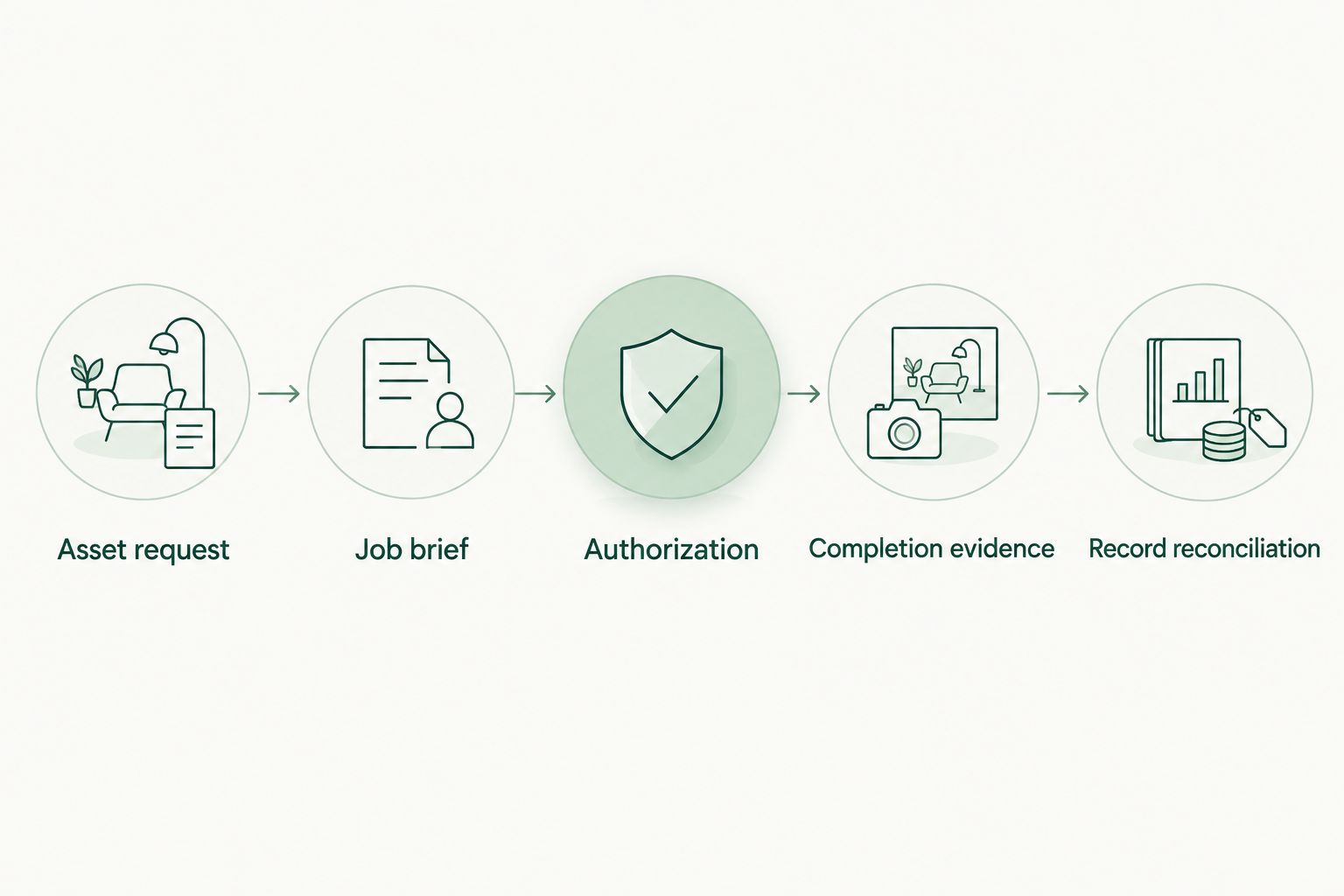
*Authorization belongs between the job brief and the removal assignment.*
Keep the asset identifier in the brief and evidence index, but avoid putting sensitive property details into filenames shared outside the authorized group. Your evidence should remain traceable without exposing unnecessary information.
When an asset request changes
Use a revision workflow whenever the requested cleanout changes after the original handoff. A changed request is a review trigger, not automatic authorization for additional removal.
The original-request workflow is best for a newly defined assignment. The revision workflow is best for added rooms, newly discovered contents, changed access, or corrected retained-item instructions.
| Workflow | Best for | Benefit | Limitation | |---|---|---|---| | Original-request handoff | A new cleanout assignment | Establishes the full scope before assignment | Requires upfront clarification and authorization | | Revision handoff | A changed or expanded assignment | Preserves the original scope while documenting changes | Requires renewed review and provider acknowledgment |
- Preserve the original brief and create a dated revision.
- Describe exactly what changed and which areas or items it affects.
- Ask the responsible representative to approve the changed work.
- Obtain the provider's acknowledgment of the revised scope before that work proceeds.
- Update the evidence plan and retain both versions with the asset record.
For example, if a garage becomes accessible after an interior-only assignment, document the garage as a scope change. Do not assume the original instruction included spaces the provider could not inspect.
Keep your 2026 revision log chronological. If a request changes while work is underway, tell the provider which affected work must stop pending clarification and record that instruction.
Troubleshooting
The provider asks what “complete cleanout” includes
Replace the phrase with room-by-room instructions, retained-item rules, and explicit exclusions. Ask the provider to identify any remaining ambiguity before accepting the assignment.
The property condition differs from the photos
Pause the affected work and request current evidence. Reconcile the difference with the authorized representative, then issue a revised brief if the scope changes; do not silently expand the assignment.
The provider reports completion, but evidence is incomplete
Request the missing views or documents and keep the review outcome unresolved. If a return visit is necessary, coordinate it separately rather than recording unverified work as accepted.
Access fails or someone is present at the property
Stop entry or removal and contact the person responsible for authorized access. Resolve possession and entry questions through the appropriate asset representative or counsel; the provider should not make that determination.
The wrong asset appears in a message or attachment
Stop the handoff and verify the address and identifier against the source request. Correct the brief, redistribute the corrected version, and obtain acknowledgment from recipients who received the earlier instructions.
Customize your workflow
Keep 1 job brief per assignment and connect revisions to that brief. This gives the provider a clear working instruction without combining unrelated properties or erasing earlier approvals.
For repeat assignments, standardize your brief headings and evidence checklist. Keep property-specific decisions separate: access, retained items, exclusions, and authorization should never carry over automatically from another job.
Expelled supports the provider-connection part of this process as a property cleanout marketplace. Your organization remains responsible for its approval rules, and each independent provider remains a separate party to assess and coordinate with.
Before reusing your 2026 template, remove old access details, names, attachments, and asset identifiers. A copied template should preserve the structure, not another property's instructions.
FAQ
How do I connect a RES.NET asset request to foreclosure cleanout?
Create a job brief from the asset request, obtain written authorization, coordinate with an independent provider, and reconcile completion evidence with the approved scope. This is a documented handoff rather than a native software integration.
Does this workflow require an automatic RES.NET integration?
No. You can use a controlled job brief and your account's permitted recordkeeping process. Do not assume a connector exists or that an external service can update your asset records.
Does Expelled perform foreclosure cleanouts?
No. Expelled is an online marketplace that connects homeowners, property professionals, and businesses with independent providers offering property cleanouts, junk removal, and hauling services.
What should I send a foreclosure cleanout provider?
Send the approved scope, relevant photos, access conditions, retained-item instructions, exclusions, and completion requirements. Share only information needed for the assignment and protect sensitive access details.
Can a provider remove everything inside a foreclosed property?
A provider should remove only items covered by documented authority and the approved assignment. Resolve uncertain possession, ownership, or disposal questions with the responsible representative or counsel before removal.
What happens when the asset request changes after assignment?
Create a dated scope revision and obtain approval before the changed work proceeds. Preserve the original brief and ask the provider to acknowledge the revised instructions.
What evidence should I collect after a foreclosure cleanout?
Collect evidence that lets a reviewer compare the completed work with the authorized scope. Use comparable before-and-after views and document exclusions, inaccessible areas, and unresolved work.
One last thing
The most useful completion photo can be the one showing what stayed. When a brief excludes an appliance, document, fixture, or room, evidence that it remained untouched helps the reviewer verify the assignment's boundaries—not just the volume removed.
Add retained-item verification to your next job brief before you send it to a provider.