
Instead of manually chasing an HOA notice, hauling arrangements, and follow-up emails, use an HOA violation cleanout workflow that connects the cited condition to an authorized removal scope and documented follow-up. This 2026 guide takes you from the notice to a completed cleanout without confusing provider completion with HOA acceptance.
TL;DR
- An HOA violation cleanout workflow separates removal work from HOA acceptance; document both before closing the record.
- Expelled connects homeowners and property professionals with independent providers for property cleanouts, junk removal, and hauling.
- Confirm removal authority, access restrictions, and excluded materials before arranging hauling.
- Compare independent providers against the same scope, then submit completion evidence through the HOA’s stated channel.
Why this matters
A cleanout addresses physical items. An HOA notice identifies a condition the association wants addressed, which can include work outside hauling. Removing a pile does not establish that every cited condition is resolved.
Expelled is best for homeowners and property professionals who want to connect with independent providers for property cleanouts. Expelled is a marketplace, not the company performing the removal; confirm the actual scope and arrangements with the independent provider.
Keep your 2026 cleanout record focused on evidence: what the notice identifies, what you authorize, what the provider removes, and what the HOA confirms. This separates the removal task from the association’s review and makes unresolved items visible.
Before you start
- Gather the notice and communication instructions. Keep the original notice, referenced photos, property address, stated deadline, and any instructions for submitting a response. Ask the HOA to clarify an unclear requirement rather than interpreting it for the provider.
- Confirm authority and access. Identify who can authorize removal, who owns the items, and who can arrange entry. Have current photos and any gate, loading, parking, or common-area restrictions ready.
- Check the hidden scope problem. A notice can identify more than removable junk. Separate hauling from repairs, vegetation work, cleaning, or other tasks; confirm whether the independent provider handles each requested activity before scheduling.
Do not treat an HOA notice as permission to discard someone else’s belongings. For occupied rentals, disputed ownership, or estate property, establish the required authority before removal. Keep disputed items outside the approved scope until that question is resolved.
Notice record
Use a document or spreadsheet you control. The bold labels below are suggested record headings, not fields or buttons in an Expelled interface.
- Create 1 job record. Use a title such as *2026 HOA cleanout — property address*. Store the notice and subsequent correspondence with that record so the provider’s work does not become detached from the original requirement.
- Copy the cited condition. Under Notice requirement, reproduce the relevant wording without broadening it. If the notice identifies stored items beside a garage, do not silently turn that into a whole-property cleanout.
- Record the response instructions. Under Deadline and submission, enter the date and communication channel stated in the notice. Record any separate inspection or follow-up instructions exactly as supplied.
- Translate the condition into tasks. Under Removal scope, identify each item or group, its location, and the requested action. Put non-hauling tasks under Separate work rather than assuming removal includes them.
- Identify the decision-maker. Under Authorization, record who approves removal, who answers provider questions, and who submits the HOA response. For managed property, distinguish the owner’s approval from the manager’s coordination role.
Expected result: You have a traceable scope tied to the notice, with an owner for each unresolved question. Someone unfamiliar with the property can distinguish the cited condition from optional cleanup work.
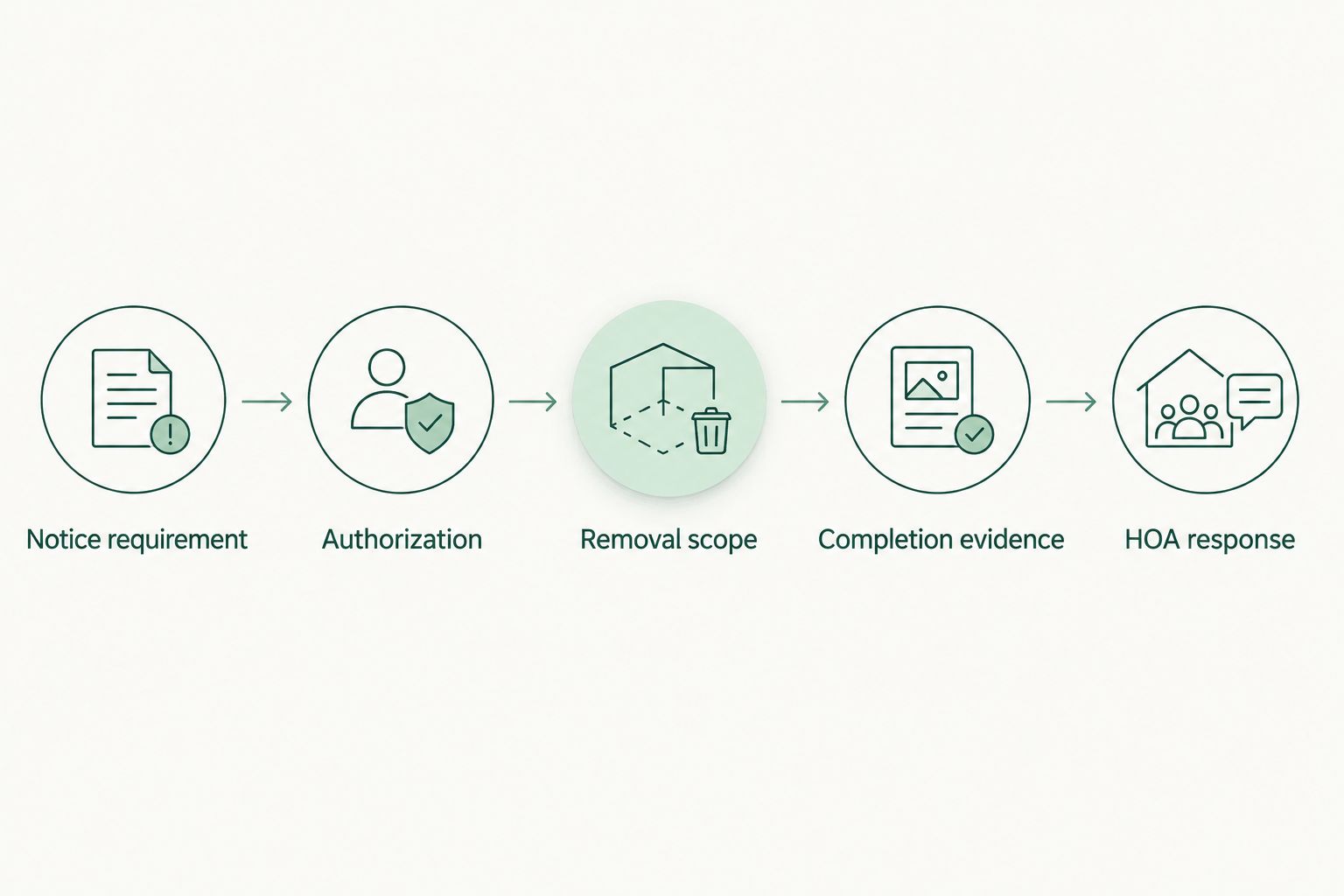
*Keep the removal scope tied to the notice, then document the work and the HOA response separately.*
Provider brief
A useful brief tells an independent provider what to remove and what would prevent the work. Photos help, but written boundaries prevent a visible object from being mistaken for an authorized removal item.
- Build 3 photo sets. Capture an overview of the cited area, close-ups of the removal items, and the access route. Label them Overview, Items, and Access so the provider can distinguish the job from its loading conditions.
- Write an item inventory. Describe recognizable objects and groups: a sofa, bagged debris, loose timber, or boxed household contents. State quantities you actually counted; mark an unknown quantity as unknown instead of presenting a guess as measured volume.
- List exclusions. Under Keep and exclude, name belongings that remain, disputed items, and materials needing separate assessment. Identify suspected chemicals, batteries, sharps, or unknown containers without opening or moving them for a better photo.
- Describe access constraints. Include stairs, narrow passages, locked gates, parking restrictions, and loading rules that apply to the property. Confirm who handles access permissions; do not assume a provider can use a common area.
- Request a written scope response. Ask what the provider accepts, what is excluded, what preparation is required, and how changes discovered on arrival will be handled. Request clarification before treating the arrangement as confirmed.
Expected result: Each provider receives the same description and can identify exclusions before the job. You retain a written boundary between requested work and accepted work.
Choose the scope before choosing the provider
A notice-only scope and a broader property cleanout are different options. Neither is automatically better; compare the work against your actual objective.
| Scope option | Best for | Advantage | Limitation | |---|---|---|---| | Notice-only removal | Addressing a clearly defined accumulation of removable items | Keeps authorization and completion evidence focused on the cited area | Leaves unrelated clutter and non-hauling tasks unresolved | | Broader property cleanout | Coordinating additional, separately authorized removal work | Puts related removal tasks into one written brief | Requires a wider inventory, more exclusions, and separate checks against the notice |
Choose notice-only removal when your immediate objective is a specific cited condition. Add broader work only after identifying what else is authorized. A larger cleanout does not replace a precise response to the notice.
Provider confirmation and removal
Compare written responses by scope, not by reassuring language. A response that says the property will be cleared still needs to identify which items, which areas, and which exclusions that statement covers.
- Check scope alignment. Compare each response with your inventory. Ask the independent provider to explain omitted items, required preparation, and work that requires another service. Confirm who will perform the work rather than assuming the marketplace is the operator.
- Confirm property requirements. Check any provider-document requirements stated by the owner, property manager, or HOA. Request the relevant documents and review what they cover; a general assurance does not replace a property-specific requirement.
- Agree on access and communication. Confirm the arrival arrangement directly with the provider, identify the on-site contact, and explain how to handle a locked gate or blocked loading area. Scheduling remains subject to the provider’s confirmation.
- Set a change-approval rule. Require approval before adding items, removing anything marked to keep, or expanding into another area. If nobody authorized can answer, leave the disputed work unresolved rather than inviting an assumption.
- Verify the completed scope. Review the cited area and inventory with the provider or your authorized contact. Record remaining items and exclusions before marking the removal task complete.
Expected result: The independent provider has an accepted scope, an access plan, and a clear approval boundary. Your completion check reflects what happened, not merely what was scheduled.
The benefit of using Expelled for property cleanouts is the ability to connect with independent providers. The limitation is that the marketplace’s role does not replace provider confirmation, your authorization checks, or the HOA’s review.
Connect with independent providers
Use your item inventory, photos, and access details to describe the property cleanout.
[Visit Expelled](https://expelled.online/)
Completion evidence and HOA response
Keep 2 confirmations separate: provider completion and HOA response. The first concerns the agreed removal work; the second concerns the association’s review of its notice.
- Photograph the cited area again. Match the original viewpoints where practical. Show the full area as well as any remaining condition, rather than submitting a close-up that hides the surroundings.
- Assemble the completion evidence. Include the property identifier, notice reference if supplied, work date, a concise description of completed tasks, and relevant photos. Retain the provider’s completion record and any disposal documentation supplied.
- Submit through the stated channel. Follow the notice’s instructions and ask whether further evidence or inspection is required. If the deadline cannot be met, contact the HOA before it passes and request written instructions; do not assume an extension.
- Record the HOA response. Save the submission and reply in the job record. Until the association responds, use a status such as Removal complete; HOA response outstanding, not Violation closed.
Expected result: Your 2026 record distinguishes physical completion, submitted evidence, and the association’s response. Any unresolved condition has a named next action.
When the notice changes or new items appear
Reuse the existing record when the same notice needs follow-up. Do not overwrite the original inventory: retain it so you can distinguish completed work from a new request.
- Record the change. Save the updated notice or message and identify the newly cited condition.
- Refresh the evidence. Photograph the changed area and mark previously completed tasks separately.
- Reconfirm authorization. New items require their own ownership and removal checks, even when they sit beside an earlier pile.
- Send the revised scope. Ask the independent provider to confirm the changed work before proceeding. Previous arrangements do not establish acceptance of additional materials.
- Resubmit the relevant evidence. Explain what the follow-up work addressed and retain the HOA’s response.
Best for recurring property-management work: use the same record structure across properties, but keep each property’s notices, permissions, and evidence separate. A shared template is useful; shared assumptions about access or authority are not.
Troubleshooting
The provider cannot accept part of the pile
Ask the independent provider to identify the excluded materials and leave them outside the approved work. Arrange an appropriate disposal route separately and record whether the remaining items still affect the cited condition.
The provider cannot reach the removal area
Resolve the actual obstruction: gate access, parking permission, loading restrictions, or an unsafe route. Send updated access details and reconfirm the arrangement rather than assuming a return visit is included.
The HOA still identifies a problem after removal
Compare the response with the original notice and your completion photos. Ask the HOA to specify the unresolved condition, then separate additional hauling from repairs, cleaning, or other work. Do not repeat a cleanout without a defined remaining task.
Someone disputes ownership during the job
Pause removal of the disputed items and separate them from clearly authorized work. Refer the question to the person responsible for establishing removal authority; the independent provider should not have to decide ownership.
Completion photos do not show the whole cited area
Retake the overview from a viewpoint that shows the relevant surroundings. Keep close-ups as supporting evidence, not as a substitute for a clear view of the condition identified in the notice.
Customize your workflow
For multiple properties, add a responsible contact, next action, and evidence location to every record. Keep a separate Do not remove list wherever occupants, owners, or other parties retain belongings.
Use the junk removal guide for property managers to extend the brief beyond a single notice. Keep Expelled’s role clear throughout: the marketplace connects you with independent providers, while you coordinate authorization, scope, and the HOA response.
FAQ
What is an HOA violation cleanout workflow?
An HOA violation cleanout workflow connects a notice to an authorized removal scope, provider confirmation, completion evidence, and HOA follow-up. It tracks the removal job separately from the association’s response.
Can Expelled perform my HOA cleanout?
Expelled connects you with independent providers; it does not perform the cleanout itself. Confirm the accepted materials, access arrangements, and scope directly with the independent provider.
What should I send a provider before an HOA cleanout?
Send the removal inventory, current photos, access details, exclusions, and relevant requirements from the notice. Share only the personal information needed to describe and coordinate the job.
Does removing the junk automatically close the HOA violation?
Removing the junk does not establish that the HOA has accepted the correction. Submit the requested evidence and retain the association’s response before recording the notice as resolved.
What if I cannot meet the deadline in my HOA notice?
Contact the HOA before the stated deadline and request written instructions or an extension. A provider booking does not itself change the notice’s deadline.
Can I use this workflow for a rental property in 2026?
Yes, use this workflow for a rental property in 2026 after establishing authority to remove the specific items. Keep ownership questions, occupant belongings, access permission, and the owner’s authorization separate from the hauling instructions.
One last thing
Keep the notice reference on the completion evidence. A photo shows a condition, but the reference connects that condition to the request you are answering. For your 2026 records, retain both the removal evidence and the HOA’s response rather than treating either as a substitute for the other.