
Instead of manually chasing every AppFolio junk removal request through messages, use a coordinator-led workflow that turns the request into a documented scope, provider confirmation, and completion record. This 2026 guide explains the handoff; it does not describe an automated AppFolio integration or automatic booking.
TL;DR
- An AppFolio junk removal request needs an approved scope before a provider appointment is confirmed.
- Expelled connects property managers with independent providers; it does not perform property cleanouts.
- Keep removal authorization, access instructions, and provider confirmation attached to the maintenance record.
- Confirm completion against the approved item list, not just a provider's arrival.
Why this matters
A maintenance request describes a problem. A removal assignment must also establish what can leave the property, who authorizes it, and how the provider gets access. Without those decisions, a request for discarded furniture can turn into an argument about belongings that should have stayed.
Expelled is best for property managers seeking a marketplace connection to independent junk removal and property cleanout providers. Use Expelled for that connection, while keeping approval and recordkeeping responsibilities with your property team.
For your 2026 procedure, define *scheduled* as a provider-confirmed appointment with an agreed scope and access plan. A submitted inquiry or preferred date is not confirmation.
Before you start
- Accounts and access: Have authorized access to the relevant AppFolio maintenance record and the ability to communicate with the property contact, approver, and independent provider. Assign a coordinator responsible for updating the record.
- Job materials: Gather an item list, current photos, the property address, access restrictions, and the person authorized to approve removal. Keep sensitive access credentials out of broadly shared messages.
- The non-obvious gotcha: Possession of the property does not establish permission to discard every item inside it. Resolve ownership, required notices, and applicable abandoned-property procedures before instructing a provider to remove belongings.
Use the field names below as headings in your own job brief, not as AppFolio interface labels. Keep them in the record format your organization permits; this workflow does not depend on a particular screen layout.
Request scope
The first configuration unit is the job brief. Keep the request specific enough that another coordinator can understand it without calling the original requester.
- Open the relevant maintenance record using your authorized AppFolio access. Review the description and attachments before contacting a provider.
- Create a brief with Record reference, Property, Removal items, Keep items, Access, Authorization, and Requested window. These are suggested template headings, not software settings.
- Describe each item by type, quantity, and location. Write *sofa in the ground-floor common room*, rather than *junk inside*.
- Identify excluded items explicitly. Mark anything awaiting an ownership decision as *not approved for removal*.
- Request missing photos and access details from the property contact. Do not substitute an old vacancy photo for the current condition.
For a repeatable photo checklist, request 3 views: the items, the carrying route, and the pickup access point. This is a documentation recommendation, not a provider requirement. Add close-ups when an item or obstruction needs explanation.
A scope note dated in 2026 should still identify when the photos were taken. The date on the maintenance request does not establish that the pictured pile remains unchanged.
Expected result: The maintenance record contains a current removal list, an explicit keep list, and an identified authorization owner. Unresolved items remain outside the approved scope.
Provider handoff
The next unit converts the approved brief into a provider conversation. Share the same brief with each independent provider you consider so the responses address the same work.
- Send the job location, approved item list, relevant photos, carrying route, and requested appointment window. Ask the provider to confirm whether the job falls within its service area and accepted work.
- Ask what remains unclear. Separate ordinary furniture from materials needing specific handling, and disclose stairs, restricted parking, elevator reservations, or disassembly needs.
- Ask the provider to state included work and exclusions in writing. Confirm who handles loading, required disassembly, and removal from the stated location.
- Verify the provider documentation your organization requires. Do not treat a marketplace connection as proof that every property-specific requirement has been satisfied.
- Record the provider's response against the maintenance reference. Resolve differences before selecting the provider.
Use the junk removal guide for property managers when standardizing the wider approval process. The individual job brief should remain narrower: what this provider is being asked to remove from this property.
The benefit of Expelled is the connection to independent providers; the boundary is that the property team must still confirm scope, suitability, and scheduling directly. Do not interpret a connection as an accepted assignment.
Expected result: You have a provider response that addresses the actual job, identifies exclusions, and states what needs confirmation before scheduling.
Appointment confirmation
Treat scheduling as a separate decision from provider selection. A provider can understand the scope without having accepted the requested appointment window.
- Obtain the required internal approval for the defined work. Keep any unresolved authorization question open rather than passing it to the crew on arrival.
- Confirm the appointment window directly with the selected independent provider. Record the provider contact and the person responsible for on-site access.
- Confirm building arrangements with the property contact: entry permission, elevator use, loading access, parking restrictions, and any tenant coordination.
- Send a final job summary containing the approved scope and exclusions. Ask the provider to acknowledge material changes rather than relying on an earlier conversation.
- Update the maintenance record using your organization's permitted notes or status process. Describe the appointment as confirmed only after the provider has accepted it.
Before marking the handoff complete, make 3 checks: provider acceptance, removal authorization, and access readiness. If any check fails, keep the job pending coordination rather than representing it as ready for service.
A useful 2026 scheduling note records the confirmation date, agreed window, provider contact, and access owner. Do not include a reusable entry code in a message distributed beyond the people who need it.
Expected result: The record shows a provider-confirmed appointment, an approved scope, and a workable access plan. The requested date and confirmed window are distinguishable.
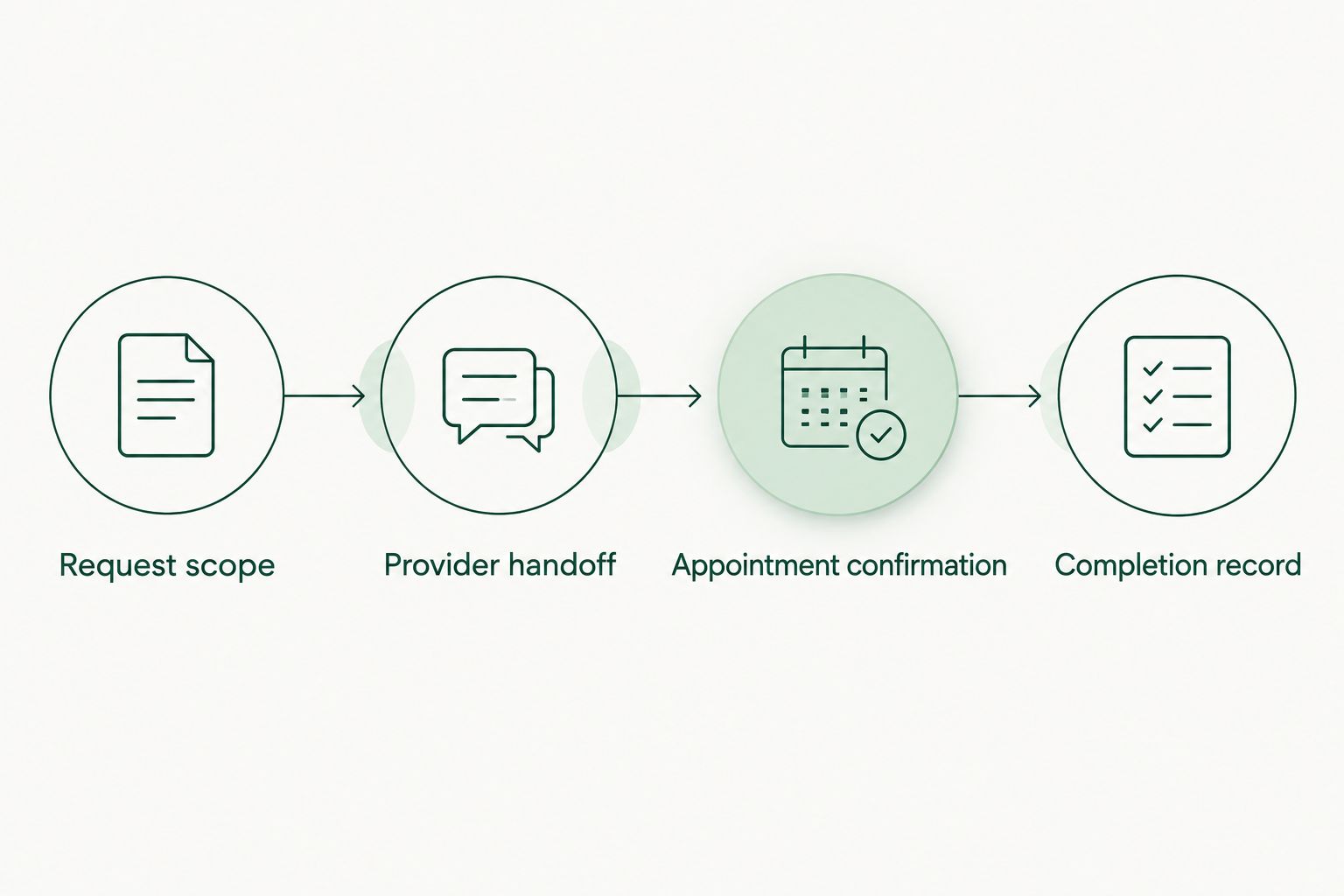
*Confirm the scope and access plan before treating the appointment as scheduled.*
Completion record
Close the request against the approved work, not against a message that the provider visited. Attendance and completion answer different questions.
- Ask the authorized property contact to verify which approved items were removed. Compare the result with the job brief and relevant photos.
- Record items left behind and the reason. Distinguish an intentional exclusion from incomplete approved work.
- Attach completion documentation through your organization's permitted process. Keep any provider paperwork associated with the correct maintenance reference.
- Resolve discrepancies before closing the maintenance record. If additional removal is required, describe the remaining scope rather than reopening the original instructions without explanation.
Use 2 photo sets where appropriate: before removal and after removal. This suggested recordkeeping method helps the property contact compare the agreed scope with the result; it does not replace inspection or authorization.
Expected result: A person reviewing the closed request can identify what was approved, what was removed, and what remains unresolved.
When an AppFolio request changes
An updated request needs a scope check, not an automatic new booking. Added items, a changed address, or a different access route can alter the assignment after a provider has accepted it.
Compare these adjacent workflows before choosing your handoff:
| Workflow | Best for | Advantage | Limitation | |---|---|---|---| | Initial request handoff | A newly approved, defined removal job | Establishes one scope before provider confirmation | Requires clarification when the initial request is incomplete | | Changed-request handoff | Added items or changed conditions on an existing job | Keeps revisions attached to the existing record | Requires renewed provider acknowledgment and sometimes renewed approval |
For a changed-request handoff:
- Compare the update with the last approved brief. Identify the changed items, location, access conditions, or requested window.
- Write a revision note stating what changed and what remains unchanged. Preserve the earlier scope for context.
- Obtain renewed authorization where your property procedures require it. Send the revision to the assigned provider before issuing another inquiry elsewhere.
- Ask the provider to confirm whether the appointment and accepted work still stand. Update the record only after receiving that response.
Do not treat a request edit as provider acceptance. In your 2026 procedure, assign responsibility for checking revisions so changes do not sit unnoticed between the requester and the provider.
Troubleshooting
The provider cannot confirm the work from the photos
Replace distant room photos with item-level views and a written inventory. Include the route out of the property. A photograph of a pile does not explain whether removal involves stairs or a restricted loading area.
The request includes belongings with unclear ownership
Pause removal of the disputed items and refer the question to the authorized property decision-maker. Keep those items on the exclusion list until the required review is complete. Do not ask the provider to decide ownership at pickup.
The requested date appears scheduled, but nobody accepted it
Check for direct provider confirmation. If the record contains only a preferred date, correct the note and contact the provider. Tell the property contact the difference between a requested window and an accepted appointment.
An updated request creates duplicate provider inquiries
Check the maintenance reference before sending another handoff. Maintain one coordinator and a visible current assignment. If you replace a provider, communicate the change to the affected parties rather than leaving parallel instructions active.
The crew arrives but cannot enter
Contact the designated access owner and follow the property's access procedure. Record the failed access attempt and reconfirm any new arrangement directly with the provider. Do not assume the original appointment remains valid after access fails.
Customize your workflow
Build a reusable brief for the property types you manage. Keep the core authorization and confirmation checks, then add relevant details for apartment common areas, occupied units, offices, or vacant properties.
For repeat work, maintain a contact role rather than relying on a single person's name: approver, access owner, coordinator, and completion reviewer. Assign the people for each job. This keeps responsibilities visible when staff change.
Expelled connects homeowners, property professionals, and businesses with independent providers. Use that connection alongside your internal controls, not in place of them; service scope and appointment arrangements still require direct confirmation.
FAQ
How do I turn an AppFolio junk removal request into a scheduled appointment?
Define and approve the removal scope, connect with an independent provider, and obtain direct appointment confirmation. Record the accepted window and access owner with the maintenance request.
Does this workflow automatically book junk removal from AppFolio?
No. This is a coordinator-led workflow for documenting and confirming a provider handoff, not an automated integration or automatic booking process.
Does Expelled perform the property cleanout?
No. Expelled is an online marketplace that connects customers with independent providers offering property cleanouts, junk removal, and hauling services. Confirm the job details directly with the selected provider.
What should I include in the removal request?
Include the property location, approved item list, keep list, current photos, access conditions, authorization owner, and requested appointment window. Identify unresolved items as excluded until they are approved.
What happens if the tenant adds more items after scheduling?
Treat added items as a scope revision. Obtain any required approval and ask the assigned provider to confirm the revised work before treating the change as accepted.
Can I schedule removal before deciding who owns the belongings?
Do not authorize disposal of belongings with unresolved ownership. Follow the applicable property procedures and obtain a decision from the authorized person before including those items in the removal scope.
When should I close the maintenance request?
Close the request after the authorized contact verifies the approved work and any discrepancies are resolved. Record exclusions and remaining work so closure does not imply that every item on the property was removed.
One last thing
Keep the keep list next to the removal list, not buried in an earlier message. A successful 2026 handoff documents both what should leave and what must stay. Before the appointment, ask the property contact to verify those lists against the current scene.